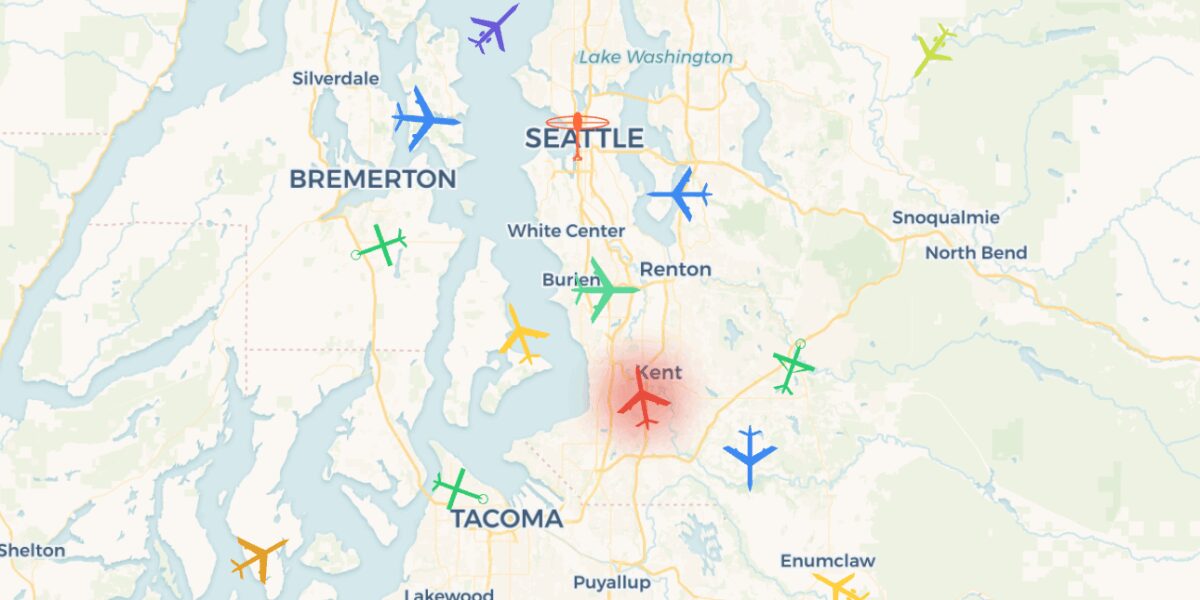
 LIVE FLIGHT TRACKERADSB Tracker LiveReal-time ADS-B from open-source receivers. Check traffic before you push out of the hangar.Download for iPhoneGet it on Google Play
For general aviation pilots, the pre-flight routine has expanded over the past decade to include ADS-B traffic awareness alongside the traditional checklist items. Knowing what’s flying at and around your departure airport before you start the engine changes how you plan the first 10 minutes of the flight — particularly at non-towered fields, busy GA airports with mixed VFR/IFR traffic, and during weather periods when traffic compresses into specific corridors.
Here’s how pilots are using mobile ADS-B trackers as part of pre-flight planning in 2026.
The Pre-Flight Traffic Check
Five minutes before you walk to the aircraft, open the tracker and check:
1. Traffic in the pattern at your departure airport. Are aircraft flying the standard pattern? Any opposite-traffic situations? At a non-towered field, knowing there are three aircraft in the pattern flying left-traffic for runway 27 lets you announce your taxi correctly and plan your departure flow.
2. Inbound traffic 5-15 nautical miles out. Aircraft on a 10-mile final or entering the pattern from a downwind entry. Knowing the approach side matters for runway selection at fields with multiple options.
3. En-route traffic in your initial climb area. If you’re departing into a busy en-route corridor (Class B/C arrivals, victor airway crossings), traffic awareness before launch helps you anticipate the first heading change.
4. Departure pattern from your runway choice. Are aircraft launching from your intended runway already? Their climb-out heading affects your spacing.
5. Helicopter traffic. Particularly relevant at airports with rotary-wing operations. Helicopters fly different patterns and altitudes; ADS-B catches them too if equipped.
Non-Towered Field Workflow
At non-towered airports, the pre-flight tracker check pairs with the CTAF self-announcement workflow:
- Check ADS-B for current pattern traffic. Note positions and types.
- Listen to CTAF for active calls. Cross-reference with what you see on ADS-B.
- Confirm runway in use based on observed traffic flow.
- Plan your taxi based on traffic congestion at run-up area.
- Make your taxi call on CTAF.
The tracker gives you visual confirmation of what’s happening before you contribute to the radio environment. New CFI students sometimes describe this as “seeing what they’re hearing” — the radio calls suddenly map to specific aircraft positions.
Towered Field Workflow
At towered fields, the pre-flight tracker check serves a different purpose — anticipation:
- How long is the inbound IFR line at the FAF?
- Is the tower running 27 or 09? (visible from traffic flow direction)
- Where will my IFR clearance route me on initial vector?
- How busy is the next-out queue at the run-up area?
For ground/clearance/tower interactions, knowing the broader traffic picture means your responses align with controller intent rather than catching you off-guard. “Cleared for takeoff, right turn to 270 to follow traffic” lands differently when you’ve already seen the traffic to your west.
LIVE FLIGHT TRACKERADSB Tracker LivePre-flight traffic check from your phoneDownload for iPhoneGet it on Google PlayWhat ADS-B Won’t Tell You
Several traffic situations remain invisible to ADS-B:
Aircraft without ADS-B Out. Some antique aircraft, balloons, gliders without electrical systems, and certain ultralight-class aircraft are exempt from the ADS-B mandate. They show up visually but not on the tracker.
Aircraft with disabled equipment. Equipment failures happen. An aircraft with non-functional ADS-B Out broadcasts nothing. Pre-flight tracker check doesn’t catch these.
Surface traffic. Taxiing aircraft sometimes don’t broadcast position (or broadcast at altitude that filters incorrectly on consumer trackers). Use ground/tower communications for ramp and taxiway awareness.
Birds and wildlife. No comment needed.
The pre-flight tracker check supplements pattern observation and radio monitoring; it doesn’t replace either. Use it as one input among several.
For Pilots With Cockpit ADS-B In
If your aircraft has integrated ADS-B In (Garmin GNS/GTN, Avidyne IFD, or portable ADS-B receivers like the Stratus or Sentry), the pre-flight phone-based check serves a different purpose than the in-cockpit display:
- Phone has wider geographic view (further from airport)
- Cockpit display has integrated chart overlay
- Phone can show traffic before engine start (cockpit display needs avionics power)
- Cockpit display gets traffic alerts via TAS or TIS-B during flight
Most pilots with cockpit ADS-B In also keep a tracker app on their phone for pre-flight checks and as a backup view during cruise.
Hangar Operations Context
If you’re based at an FBO or shared hangar facility, pre-flight tracker awareness has additional uses:
Coordinating departures with hangar neighbors. If two pilots from the same hangar are preparing to depart, the tracker helps with sequencing — who launches first, what heading each takes initial.
Visitor/transient aircraft tracking. Is the inbound aircraft to the FBO ramp on a 5-mile final? If you’re handling ramp services, the tracker tells you when to head out for the marshal.
Fly-in and event days. Heavy traffic at the hangar means heavy traffic in the air. The tracker view shows when your home field is busy enough to delay your launch or change your departure.
Specific Use Cases by Aircraft Type
Single-engine pistons (Cessna 172, Piper Cherokee, Cirrus): Standard pattern operations. Pre-flight tracker check is primarily about pattern awareness.
Twin-engine pistons and turbo singles: Often operating IFR even on VFR days. Pre-flight check focuses on departure procedure routing and en-route corridor traffic.
Helicopters: Different pattern, different altitudes. Pre-flight check confirms fixed-wing traffic flow so helicopter operations integrate cleanly.
Light sport and experimental: Variable ADS-B equipage. Pre-flight check is most useful for awareness of fixed-wing traffic in the area; not all peers will be on the tracker.
Business jets and turboprops: Generally IFR. Pre-flight check covers Class B/C departure corridor congestion. The tracker view of a 50-mile radius gives context for the IFR clearance request.
The Five-Minute Pre-Flight Tracker Routine
For pilots integrating this into checklist flow:
Minute 1: Open tracker, set view to home airport at 5-10 mile radius.
Minute 2: Identify pattern traffic. Note count, direction, types.
Minute 3: Identify inbound traffic 5-15 miles out. Note timing of arrivals.
Minute 4: Pull view back to 30-50 mile radius. Check en-route corridor congestion if departing into one.
Minute 5: Cross-reference with ATIS/AWOS, current weather, NOTAMs already reviewed. Build the integrated mental picture before walking to the aircraft.
This adds five minutes to pre-flight but produces meaningfully better situational awareness than checking weather and NOTAMs alone.
Privacy and the Tracking Question
One nuance worth knowing: when your aircraft is on the ramp with ADS-B Out broadcasting, other pilots in the area can see your tail number, position, and type on their own trackers. This is the privacy implication of universal ADS-B equipage.
For aircraft owners who want privacy, the FAA’s Limiting Aircraft Data Displayed (LADD) program suppresses commercial trackers. Community-data trackers (including most consumer apps) don’t honor LADD. The trade-off between traffic awareness and privacy is one the industry continues to navigate.
For the underlying ADS-B Out technology and the receiver network powering public tracking, see the ADS-B flight tracker apps comparison. For the broader aviation tech context, see ADS-B Out infrastructure explained.
LIVE FLIGHT TRACKERADSB Tracker LiveADSB Tracker Live— From the HangarDownload for iPhoneGet it on Google Play
Stay in the loop
Get the latest aircraft hangar finder updates delivered to your inbox.